最近在看安卓的应用级虚拟化的架构
这一章我们先来说一下大致架构
大致框架是这样的
构建一个类似service manager的服务
首先我们先抛开binder的底层机制,我们需要明白,如果一个进程要通过binder调用另一个进程,那么这个进程就要获取到他的ibinder
我们一层一层往下看
binderprovider
继承自组件contentprovider
1
2
3
4
5
6
7
8
9
10
11
12
13
14
15
16
17
18
19
20
21
22
23
24
25
26
27
28
29
30
31
32
33
34
35
36
37
38
39
40
41
42
43
44
45
46
47
48
49
50
51
52
53
54
55
56
57
58
59
60
61
62
63
64
65
66
67
68
69
70
71
72
73
74
75
76
77
78
79
80
81
82
83
84
85
86
87
88
89
90
91
92
93
94
95
96
97
98
99
100
101
102
103
104
105
106
107
108
109
110
111
112
113
114
115
116
117
118
119
120
121
122
123
124
125
126
127
128
129
130
131
132
133
134
135
136
137
138
139
140
141
142
143
144
145
146
147
148
149
150
151
152
153
154
155
156
157
158
159
160
161
162
package com.lody.virtual.server;import android.content.ComponentName;import android.content.ContentProvider;import android.content.ContentValues;import android.content.Context;import android.content.Intent;import android.content.ServiceConnection;import android.database.Cursor;import android.net.Uri;import android.os.Build;import android.os.Bundle;import android.os.IBinder;import android.os.RemoteException;import android.os.ResultReceiver;import com.lody.virtual.client.core.VirtualCore;import com.lody.virtual.client.ipc.ServiceManagerNative;import com.lody.virtual.client.stub.KeepAliveService;import com.lody.virtual.helper.compat.BundleCompat;import com.lody.virtual.helper.compat.NotificationChannelCompat;import com.lody.virtual.server.accounts.VAccountManagerService;import com.lody.virtual.server.am.VActivityManagerService;import com.lody.virtual.server.content.VContentService;import com.lody.virtual.server.device.VDeviceManagerService;import com.lody.virtual.server.interfaces.IServiceFetcher;import com.lody.virtual.server.job.VJobSchedulerService;import com.lody.virtual.server.location.VirtualLocationService;import com.lody.virtual.server.notification.VNotificationManagerService;import com.lody.virtual.server.pm.VAppManagerService;import com.lody.virtual.server.pm.VPackageManagerService;import com.lody.virtual.server.pm.VUserManagerService;import com.lody.virtual.server.vs.VirtualStorageService;public final class BinderProvider extends ContentProvider { private final ServiceFetcher mServiceFetcher = new ServiceFetcher (); private static boolean sInitialized = false ; @Override public boolean onCreate () { return init(); } public static boolean isInitialized () { return sInitialized; } private boolean init () { if (sInitialized) { return false ; } Context context = getContext(); if (context != null ) { if (android.os.Build.VERSION.SDK_INT >= android.os.Build.VERSION_CODES.O) { NotificationChannelCompat.checkOrCreateChannel(context, NotificationChannelCompat.DAEMON_ID, "daemon" ); NotificationChannelCompat.checkOrCreateChannel(context, NotificationChannelCompat.DEFAULT_ID, "default" ); } try { context.startService(new Intent (context, KeepAliveService.class)); } catch (Exception e) { e.printStackTrace(); } } if (!VirtualCore.get().isStartup()) { return false ; } VPackageManagerService.systemReady(); addService(ServiceManagerNative.PACKAGE, VPackageManagerService.get()); addService(ServiceManagerNative.ACTIVITY, VActivityManagerService.get()); addService(ServiceManagerNative.USER, VUserManagerService.get()); VAppManagerService.systemReady(); addService(ServiceManagerNative.APP, VAppManagerService.get()); if (Build.VERSION.SDK_INT >= Build.VERSION_CODES.LOLLIPOP) { addService(ServiceManagerNative.JOB, VJobSchedulerService.get()); } VNotificationManagerService.systemReady(context); addService(ServiceManagerNative.NOTIFICATION, VNotificationManagerService.get()); VAppManagerService.get().scanApps(); VAccountManagerService.systemReady(); VContentService.systemReady(); addService(ServiceManagerNative.ACCOUNT, VAccountManagerService.get()); addService(ServiceManagerNative.CONTENT, VContentService.get()); addService(ServiceManagerNative.VS, VirtualStorageService.get()); addService(ServiceManagerNative.DEVICE, VDeviceManagerService.get()); addService(ServiceManagerNative.VIRTUAL_LOC, VirtualLocationService.get()); sInitialized = true ; return true ; } private void addService (String name, IBinder service) { ServiceCache.addService(name, service); } @Override public Bundle call (String method, String arg, Bundle extras) { if (!sInitialized) { init(); } if ("@" .equals(method)) { Bundle bundle = new Bundle (); BundleCompat.putBinder(bundle, "_VA_|_binder_" , mServiceFetcher); return bundle; } return null ; } @Override public Cursor query (Uri uri, String[] projection, String selection, String[] selectionArgs, String sortOrder) { return null ; } @Override public String getType (Uri uri) { return null ; } @Override public Uri insert (Uri uri, ContentValues values) { return null ; } @Override public int delete (Uri uri, String selection, String[] selectionArgs) { return 0 ; } @Override public int update (Uri uri, ContentValues values, String selection, String[] selectionArgs) { return 0 ; } private class ServiceFetcher extends IServiceFetcher .Stub { @Override public IBinder getService (String name) throws RemoteException { if (name != null ) { return ServiceCache.getService(name); } return null ; } @Override public void addService (String name, IBinder service) throws RemoteException { if (name != null && service != null ) { ServiceCache.addService(name, service); } } @Override public void removeService (String name) throws RemoteException { if (name != null ) { ServiceCache.removeService(name); } } } }
我们稍后会讲解几个结构首先这个ServiceFetcher,是作为调用的接口,通过控制ServiceCache 控制和调用服务。至于什么服务,其实就是server 提供的一些类似于 安卓系统级的binder服务。
因为contentprovider 的call 是通过ams管理并能够被外部通过contentresover调用的.
所以我们还需要在 app 的mainfest专门写注册代码以便ams发现并管理
1 2 3 4 5 6 7 8 <provider android:name ="com.lody.virtual.server.BinderProvider" ← 类 android:authorities ="${AUTHORITY_PREFIX}.virtual.service.BinderProvider" ← 唯一标识 android:exported ="true" ← 允许跨 uid android:permission ="${PERMISSION_PREFIX}.permission.SAFE_ACCESS" ← 签名级准入 android:process ="@string/engine_process_name" /> ← 承载进程 :x
根据前面的代码private class ServiceFetcher extends IServiceFetcher.Stub 他继承的IServiceFetcher.Stub 本身就是一个ibinder对象,所以我们就只需要在call函数返回bundle
1
2
3
Bundle bundle = new Bundle ();BundleCompat.putBinder(bundle, "_VA_|_binder_" , mServiceFetcher); return bundle;
里面存放ibinder就是mServiceFetcher
ServiceFetcher
1
2
3
4
5
6
7
8
9
10
11
12
13
14
15
16
17
18
19
20
21
22
23
private class ServiceFetcher extends IServiceFetcher .Stub { @Override public IBinder getService (String name) throws RemoteException { if (name != null ) { return ServiceCache.getService(name); } return null ; } @Override public void addService (String name, IBinder service) throws RemoteException { if (name != null && service != null ) { ServiceCache.addService(name, service); } } @Override public void removeService (String name) throws RemoteException { if (name != null ) { ServiceCache.removeService(name); } } }
这个类主要来自于IServiceFetcher接口结合stub静态类.stub是作为binder 的server 的服务端的接口.在这里是
1
2
3
4
5
6
7
8
9
10
public static abstract class Stub extends android .os.Binder implements com .lody.virtual.server.interfaces.IServiceFetcher { @SuppressWarnings("this-escape") public Stub () { this .attachInterface(this , DESCRIPTOR); } public static
这几个操作就是在操作serviceCache这个hashmap
1
2
3
4
5
6
7
8
9
10
11
12
13
14
15
16
17
public class ServiceCache { private static final Map<String, IBinder> sCache = new ArrayMap <>(5 ); public static void addService (String name, IBinder service) { sCache.put(name, service); } public static IBinder removeService (String name) { return sCache.remove(name); } public static IBinder getService (String name) { return sCache.get(name); } }
实现如下,这个service cache的存储的就是ibinder而这个ibinder就是client app真正要从server获取的服务.还有一点怎么把我们的这些服务编程ibinder呢? 原开源版本中使用的是一个ipcbus类,但是他要使用反射调用函数.获取每个类的函数对应的code(按顺序编码),因为ibinder本身是通过这些code调用的 这些方法,所以我们要用code。bug挖个坑,后门我们详细讲一讲安卓的binder
但是其实这么没有直接用 aidl来的方便,所以还是直接通过
类似与前面直接用继承一个
1 public class VAccountManagerService extends IAccountManager .Stub
这个类本身就是一个ibinder的形式.
host
host进程就是宿主app这个进程本身,启动的时候为后续server的执行做准备,执行的时候运行ui和 监听安装广播
server
前面我们讲到,ServiceCache 里注册了 11 个服务,而注册这个动作发生在 BinderProvider.init() 里。那问题就来了:这 11 个服务是干什么的?除了服务,server 还提供了别的东西吗?
lib/src/main/java/com/lody/virtual/server/ 这个目录,一共 22,502 行、13 个子包 。我们把它拆成三块来看:服务 、组件 ,以及它们怎么配合 。
server 提供了哪些服务
先看表格,这 11 个就是 ServiceCache 里存着的东西:
服务名
实现类
模拟的系统服务
主要职责
packageVPackageManagerServicePackageManager
虚拟包表查询、组件解析、权限/签名
activityVActivityManagerServiceActivityManager
进程池、Activity 栈、Service 绑定
userVUserManagerServiceUserManager
虚拟用户管理(多开的基础)
appVAppManagerService——
安装、卸载、扫描
accountVAccountManagerServiceAccountManager
账户、认证器、token
contentVContentServiceContentService
ContentObserver、Sync
jobVJobSchedulerServiceJobScheduler
Job 调度隔离
notificationVNotificationManagerServiceNotificationManager
通知 id/tag 改写
vsVirtualStorageService——
虚拟 SD 卡映射
deviceVDeviceManagerService——
设备指纹
virtual-locVirtualLocationServiceLocationManager
虚拟定位
里面最重的是 activity,54 个 AIDL 方法,1,271 行——因为我们没有真的 AMS,进程怎么起、Activity 栈怎么管、Service 怎么绑,全得自己写。其次是 package(34 个方法)和 account(35 个方法)。
这里有个细节值得单独说一句:这些服务类本身都是 Binder 。比如:
java
1
2
public class VActivityManagerService extends IActivityManager.Stub { ... } public class VPackageManagerService extends IPackageManager.Stub { ... }
IXxx.Stub 继承自 android.os.Binder,所以服务实例天生就是 IBinder,直接 addService(name, service) 扔进 ServiceCache 就行。这也是为什么前面说"换回 AIDL 比 ipcbus 省事"——AIDL 编译出来的 Stub 天然满足"可跨进程 + 可当接口用"两个条件,不需要运行时反射再包一层。
server提供组件
光有服务还不够。
服务是给"我们自己人"用的——客户端的 VActivityManager 通过 Binder 找到它。但系统不会调用服务 ,系统只认 virtualapp本身在manifest 里声明的组件。虚拟应用的组件在系统里根本不存在,所以凡是"系统要回调 VA"的场景,都必须有一个真实存在的组件 顶上去。
于是就有了这些组件。lib 模块的 :x 进程里一共 16 个,按 Android 四大组件分类:
Activity(8 个)
组件
干什么
ShadowPendingActivity接住虚拟应用的 PendingIntent.getActivity()
ShortcutHandleActivity桌面快捷方式点进来的跳板
ChooserActivity顶替 Intent.createChooser() 的分享面板
ResolverActivity顶替隐式 Intent 的"用哪个应用打开"
ChooseAccountTypeActivity账户类型选择
ChooseTypeAndAccountActivity账户选择
WindowPreviewActivity启动前显示窗口背景预览(防止白屏)
RequestPermissionsActivity替虚拟应用弹运行时权限
Service(5 个)
组件
干什么
KeepAliveService保活,START_STICKY
HiddenForeNotification显示一个隐藏的前台通知,提高 :x 优先级
ShadowPendingService接住 PendingIntent.getService()
ShadowJobService虚拟应用 JobService 的系统侧入口
ShadowJobWorkServiceJob 真正执行的地方
Provider(2 个)
组件
干什么
BinderProvider服务注册表入口,call("@") 返回 IServiceFetcher
ContentProviderProxy虚拟应用 Provider 的请求转发
Receiver(1 个)
组件
干什么
ShadowPendingReceiver接住 PendingIntent.getBroadcast()
这些组件按用途其实分三类:
虚拟应用的代理 ——就是 :p0..:p99 里那 399 个槽位组件(ShadowActivity$Pn 之类)。系统只认组件名,所以每个虚拟应用进程都得有一个合法名字顶着。系统 API 的回调接收器 ——比如 PendingIntent、JobScheduler、选择器这些 API,系统要求目标组件必须真实存在,那就用 ShadowPending*、ShadowJob* 去接。VA 自己用的 ——BinderProvider(注册表入口)、KeepAliveService、ShortcutHandleActivity(快捷方式)这些。
把它们都放在 :x (server进程)里,是因为这些组件必须比虚拟应用活得久 ——虚拟应用进程死了,Job 还得能触发,PendingIntent 还得能响,:x 不能跟着挂。
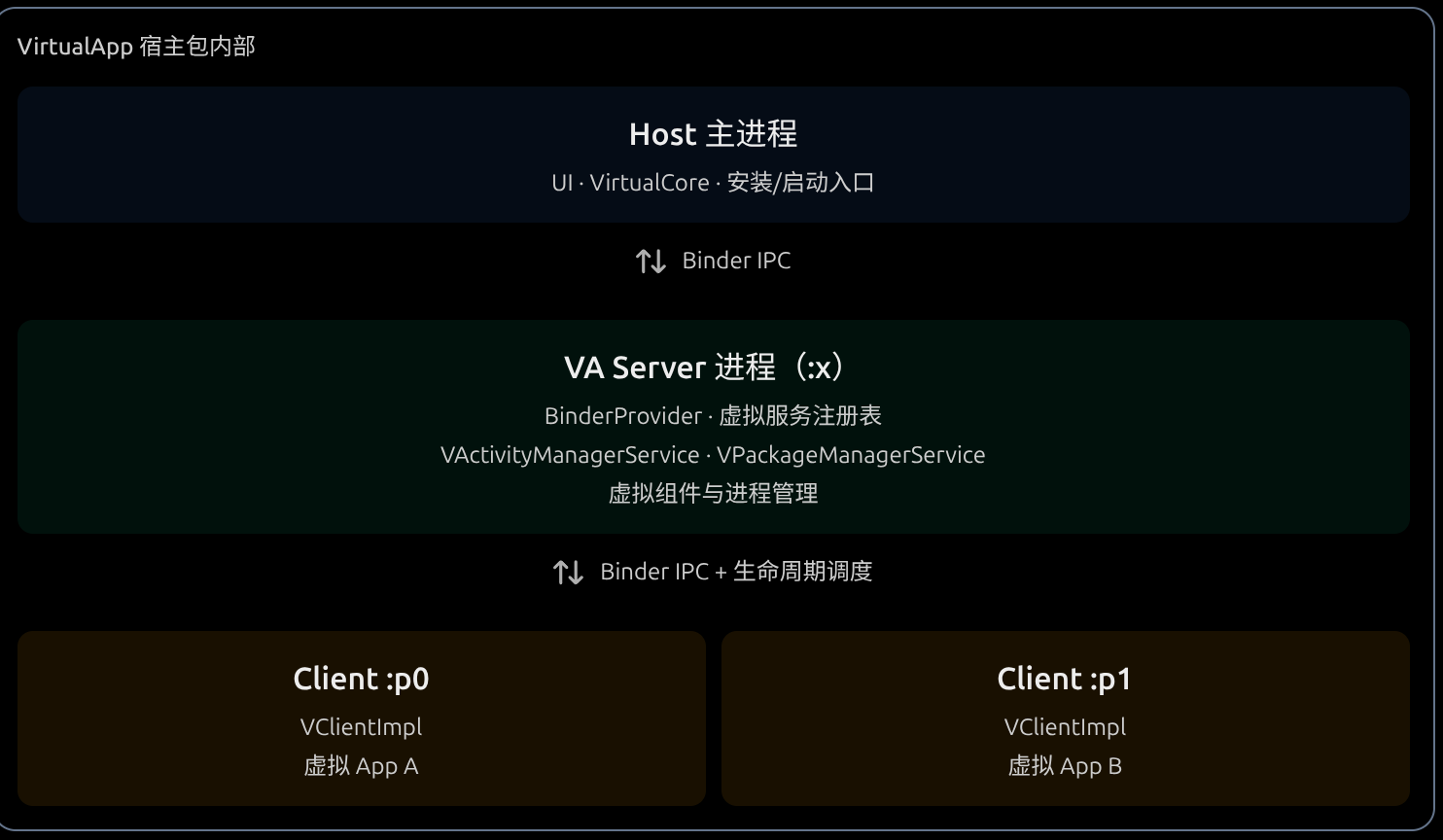 host 主进程,va server 进程 和各个 client进程。这里host主进程就可以看作vritual app本身 ,然后vaserverkey看作虚拟机内部的一个framwork 架构 。后门就是各个client 进程
而因为我们的虚拟机内部没有 service manager进程来要负责 Binder 服务的注册、查询和管理。所以我们还需要自己实现一个类似的结构